Apple Watch
Apple Watch Battery Replacement in Singapore: Cost, Swelling and When It's Worth It
In this article
- How much does an Apple Watch battery replacement cost?
- Do you actually need a new battery?
- Why is my Apple Watch screen popping off?
- What does an Apple Watch battery replacement involve?
- How long does it take?
- Is it worth replacing the battery on an older Apple Watch?
- Should you go to Apple instead?
- Will it still be water resistant afterwards?
- Apple Watch battery replacement: FAQs
- Getting it done
An Apple Watch battery replacement in Singapore costs $50 at Citri Mobile for Series 1 to Series 9, SE and SE 2, nett, with an Original Grade battery. Ultra and Ultra 2 are quoted on the day. The display has to come off to reach the battery, and most jobs are done while you wait, usually in around an hour. If the screen is lifting away from the case, the battery has swollen and you should stop charging the watch and bring it in.
How much does an Apple Watch battery replacement cost?
One price across most of the range, because the job is the same shape on every series even though the cell is a different size. These figures come straight from our live price list.
| Apple Watch | Smaller case | Larger case |
|---|---|---|
| Ultra 2 (49mm) | on quote | |
| Ultra (49mm) | on quote | |
| Series 9 (41mm / 45mm) | $50 | $50 |
| Series 8 (41mm / 45mm) | $50 | $50 |
| Series 7 (41mm / 45mm) | $50 | $50 |
| SE 2 (40mm / 44mm) | $50 | $50 |
| Series 6 (40mm / 44mm) | $50 | $50 |
| SE (40mm / 44mm) | $50 | $50 |
| Series 5 (40mm / 44mm) | $50 | $50 |
| Series 4 (40mm / 44mm) | $50 | $50 |
| Series 3 (38mm / 42mm) | $50 | $50 |
| Series 2 (38mm / 42mm) | $50 | $50 |
| Series 1 (38mm / 42mm) | $50 | $50 |
Prices are nett: what's on the quote is what you pay at collection, by PayNow, PayLah, Visa or Mastercard. "On quote" means we confirm the price and stock for that model before you travel. For a Series 10, Series 11, Ultra 3 or SE 3, message us the model and we'll tell you straight away whether we can get the battery. Every Apple Watch model we carry is priced on the Apple Watch repair page, and the battery prices sit together on the Apple Watch battery replacement page.
Do you actually need a new battery?
Check before you pay for one. On the watch, open Settings, tap Battery, then Battery Health, and read Maximum Capacity. Apple treats 80% as the point where a battery is worn. Our guide to checking Apple Watch battery health covers what the number means and the settings that drain a healthy battery fast, which is worth ruling out first.
The signs that point to the battery itself:
- It doesn't last the day. Full in the morning, dead by early evening, on the same watch face and settings you've always used.
- It shuts down at 20 or 30%. A worn cell can't hold its voltage when the watch asks for power, so it cuts out early.
- It won't charge past a certain point, or it charges and drains again within the hour.
- The screen is lifting at one edge. That one isn't a maybe. See the next section.
If the watch won't charge at all, it might not be the battery. Check the charger and the back of the watch first, using our Apple Watch not charging guide.
Why is my Apple Watch screen popping off?
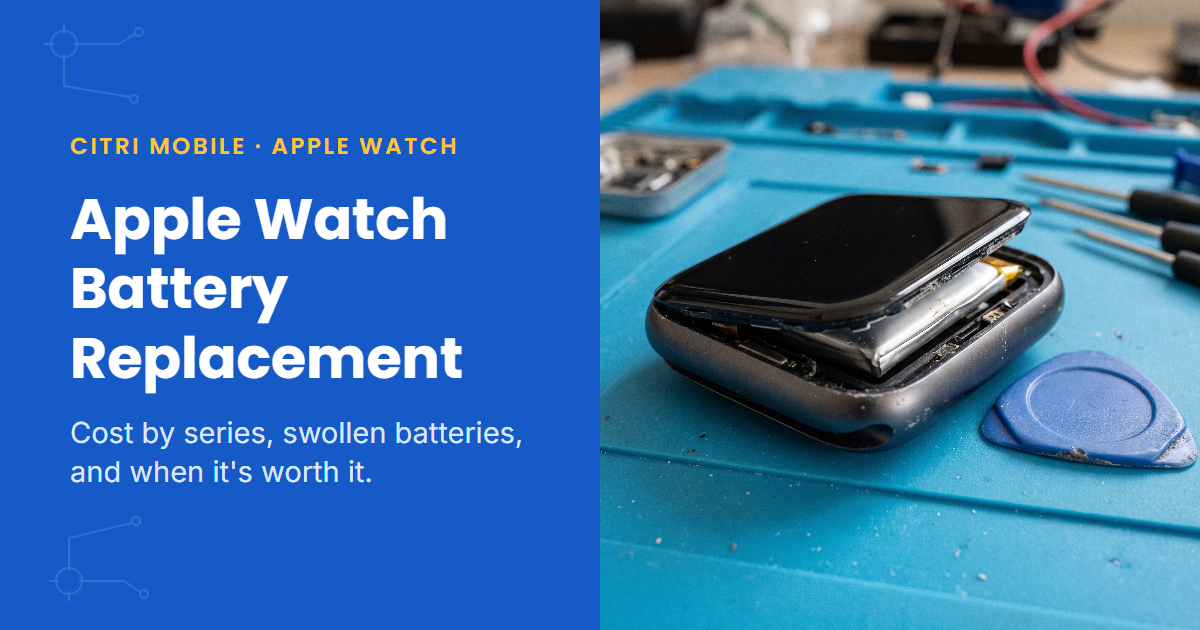
Because the battery underneath has swollen. After cracked glass, it's the most common Apple Watch job we see. A lithium cell that has started to fail produces gas, the pouch puffs up, and the only place it can go is outward, so it pushes the display out of the case from behind.
The first sign is a thin gap at one edge. Then the display tilts. Sometimes it pops right out while the watch still works. Swelling doesn't reverse, and if the watch stays on your wrist the display keeps lifting until its cable tears. At that point a battery job has become a battery plus a display.
So: take it off the charger, stop wearing it, don't press the screen back down, and bring it in. The battery is $50. That's a lot less than the display it's about to damage. Apple has run service programmes for swelling on some older Apple Watch models in the past, so if yours is still covered by Apple, ask them first.
What does an Apple Watch battery replacement involve?
More than people expect from something so small. There's no battery door on an Apple Watch. The battery sits under the display, so the job goes like this:
- Heat and lift the display. The adhesive runs right to the curved edge, so it comes off slowly with heat and thin tools. Rush it and the display cracks.
- Disconnect the display and battery cables. They're short and fragile, and the display cable is the one that tears if the screen is levered too far.
- Remove the old cell from its adhesive without bending or puncturing it, which matters most when it's already swollen.
- Fit the new battery, reconnect everything and test charging, touch, the Digital Crown and the side button.
- Reseal the display with fresh adhesive and press it down evenly.
The battery we fit is Original Grade. Apple Watch isn't part of Apple's Independent Repair Provider programme, so no shop outside Apple fits Apple-made watch parts, and we say which grade is going in before you agree to anything.
How long does it take?
Most Apple Watch battery replacements are done while you wait, usually in around an hour once we start. The heat-and-lift step and the reseal at the end take most of that time. If yours needs longer, say the display has been opened before or the battery is badly swollen, we'll tell you before we begin. Your watch data isn't touched. It stays on the watch, and it's backed up to your iPhone anyway.
Is it worth replacing the battery on an older Apple Watch?
The battery costs the same on a Series 3 as on a Series 9, so the real question is what the watch is still worth to you.
- Series 6 and newer, SE 2 and Ultra: yes. These still get watchOS updates, and a new battery makes them feel new.
- Series 4, Series 5 and the first SE: usually yes if everything else works. They stopped getting major updates at watchOS 10, but they still do the everyday jobs well.
- Series 3 and older: rarely. Their last major update was watchOS 8, apps have been dropping support, and a used later watch doesn't cost much more than the repair. We'll still do it if the watch matters to you for its own sake, and some do. But we'll tell you the maths first rather than quietly take the job.
If the glass is also cracked, price the two together before deciding. The Apple Watch screen repair guide has those figures by series.
Should you go to Apple instead?
If your Apple Watch is covered by AppleCare+ and the battery is below 80%, yes. Apple's battery service covers it at no charge, and nobody else can match that. Check your coverage on Apple's Apple Watch service page, or use our guide to checking your Apple warranty.
Outside warranty, Apple quotes its own fee for battery service on that page, usually by mail-in or through an Apple Store. Put that figure next to the table above and choose. Some people want Apple's own counter, and that's a fair reason. Others want it done today with no appointment, for less.
Will it still be water resistant afterwards?
It's resealed with fresh adhesive and fine for everyday wear, rain and washing your hands. It doesn't come back with a factory water-resistance rating, from us or from any shop outside Apple, because that needs Apple's own sealing and test equipment. If you swim with your watch, tell us before the repair so we can talk it through.
Apple Watch battery replacement: FAQs
- How much is an Apple Watch battery replacement in Singapore?
- At Citri Mobile, $50 for Series 1 to Series 9, SE and SE 2, nett, with an Original Grade battery. Ultra and Ultra 2 are quoted on the day.
- Can an Apple Watch battery be replaced?
- Yes. The display is lifted off, the old battery is removed from underneath it, a new one goes in, and the display is resealed. It's a careful job rather than a quick one, so it isn't one to try at home.
- How long does an Apple Watch battery replacement take?
- Usually around an hour once we start. If yours needs longer, for example because the display has been opened before, we'll tell you before we begin.
- My Apple Watch screen is lifting off. Is it the battery?
- Almost certainly. A swollen battery pushes the display out of the case from behind. Take the watch off charge, stop wearing it, and bring it in before the display cable tears.
- Is it worth replacing the battery on an Apple Watch Series 3?
- Usually not. Its last major update was watchOS 8 and the battery costs the same as on a newer watch. We'll do it if you want it done, but we'll tell you the maths first.
- Do you use original Apple batteries in Apple Watch?
- We fit Original Grade batteries. Apple Watch isn't covered by Apple's Independent Repair Provider programme, so Apple-made watch parts are only fitted by Apple. We tell you which grade is going in before you agree to the repair.
- What warranty do I get on an Apple Watch battery?
- A warranty of up to 100 days depending on the repair, honoured at any of our four shops rather than only the one that did the work.
Getting it done
We replace Apple Watch batteries at four shops: People's Park Centre in Chinatown, Tampines, Yishun and Jurong Point, open 11am to 9pm daily. Walk-ins are fine, but message or call first so we can confirm we have the battery for your series and case size in stock before you travel.
Send the series and case size to WhatsApp for a price and a stock check. If the screen is lifting, a photo from the side helps. Diagnosis is free, and if the watch isn't worth repairing, we'll tell you.