Tips & Guides
Water Damage in Your Phone: How to Spot and Fix
In this article
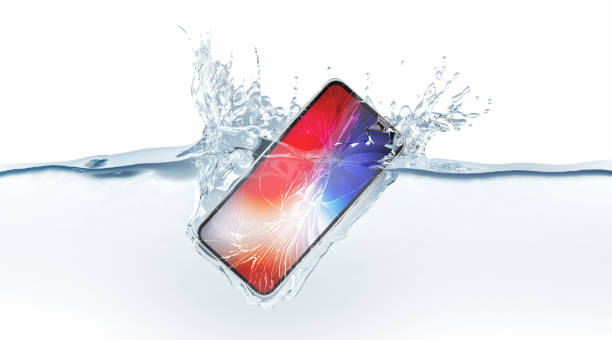
Water damage is one of the most common types of phone damage. While many modern smartphones are water-resistant, they are not entirely waterproof and can still suffer from water-related issues. Here’s a quick guide to spotting water damage in iPhones, Samsung, Huawei, and Google Pixel devices, along with steps to prevent irreversible damage.
Can Phones Work After Water Damage?
Depending on the extent of exposure, some phones may continue to function after water damage, but underlying issues can develop over time.
Modern smartphones come with an IP (Ingress Protection) rating, which determines their resistance to dust and water. Here’s what these ratings mean:
- IP67: Can withstand being submerged in water up to 1 meter deep for 30 minutes.
- IP68: Offers better water resistance, typically up to 1.5 meters for 30 minutes or more, depending on the manufacturer.
- No IP Rating: Phones without an official water resistance rating are more vulnerable to water exposure. Most budget and mid-range phones fall under this category.
Even with a high IP rating, factors such as wear and tear, cracks in the casing, and exposure to saltwater or other liquids can compromise your phone's resistance. If your phone has been exposed to water, checking for damage and drying it properly is crucial to avoid long-term issues.
How to Check for Water Damage in Phone?
Here are some physical indicators of water damage to your device:
- Check the Liquid Contact Indicator (LCI) or Liquid Damage Indicator (LDI). Most smartphones, including iPhones, Samsung, and Huawei devices, have an LCI/LDI that turns red or maroon when exposed to moisture. This is typically located in the SIM tray.
- Look for screen discolouration. Strange blotches, dark spots, or water markings can indicate that moisture has seeped into the display.
- Inspect ports for corrosion. Check the charging port, SIM tray, or headphone jack for signs of rust or discolouration.
- Check the camera lens for condensation. Fogging or water droplets inside the lens are a telltale sign of internal moisture.
You may also experience functional issues, such as:
- Unresponsive or malfunctioning touchscreen – Water exposure can interfere with screen sensors.
- Distorted or muffled audio – Water can seep into speakers, affecting sound quality.
- Overheating or unexpected shutdowns – Internal moisture can cause short circuits, leading to performance issues.
- Charging difficulties – Corrosion inside the charging port can prevent proper connectivity
Taking immediate action can help minimize damage. If your phone shows any of these signs, visit Citri Mobile for professional iPhone water damage repair in Singapore, Samsung phone repair, Huawei phone repair in Singapore, or Google Pixel repair in Singapore to prevent further issues.
How to Fix Phone Water Damage
If your phone has been exposed to water, taking quick action can increase its chances of recovery. Follow these steps to minimize damage:
Immediate Actions
- Turn It Off Immediately – Keeping your phone powered on after water exposure increases the risk of short circuits.
- Remove External Accessories – Take out the SIM card, SD card, and any protective case to allow better airflow.
- Dry the Exterior – Use a lint-free cloth to wipe away excess liquid. For ports, use a cotton bud to ensure complete water removal. Avoid shaking or blowing into the ports, as this can push water deeper inside.
- Use a Desiccant or Absorbent Materials – Place your phone in an airtight bag with absorbent materials for 24–48 hours. Silica gel packets are ideal, but rice can also work. However, be cautious, as rice particles may get lodged in ports and crevices.
What to Avoid
- Do Not Charge Your Phone – Plugging in a wet phone can cause short circuits and permanent damage.
- Do Not Press Buttons – Pressing buttons can push water deeper into internal components.
- Do Not Shake the Device – This can spread moisture to unaffected parts.
- Do Not Use a Hairdryer – Excessive heat can damage your phone’s internal circuitry.
If your phone does not function properly after drying, seek professional phone repair services in Singapore to prevent further damage.
Final Thoughts
Accidentally dropping your phone into water is a common mishap, but it doesn’t have to mean the end of your device. While many modern phones are designed to be water-resistant, they are still vulnerable to damage. Taking immediate action can significantly improve the chances of recovery and prevent permanent malfunctions.
If your phone continues to experience issues despite your best efforts, seeking professional phone repair in Singapore is the best course of action to restore its full functionality.
Need Expert Assistance for Your Water-Damaged Phone?
Citri Mobile is your reliable phone repair specialist in Singapore. Here’s how we can help:
- iPhone Water Damage Repair Singapore – Our technicians can clean, dry, and replace damaged components like the logic board, battery, and screen.
- Samsung Phone Repair – Experienced technicians can conduct thorough diagnostics and restore waterproofing where possible.
- Huawei Phone Repair Singapore – Our specialists can repair water-damaged motherboards and restore touchscreen functionality.
- Google Pixel Repair Singapore – For Pixel devices, our experts handle water-damaged batteries, charging ports, and display malfunctions.
Don’t let water damage ruin your phone. Reach out to Citri Mobile today for professional repair services!